From Asset to Amazon Listing: Using the Stress Relief Unicorn Coloring Book in Your KDP Workflow
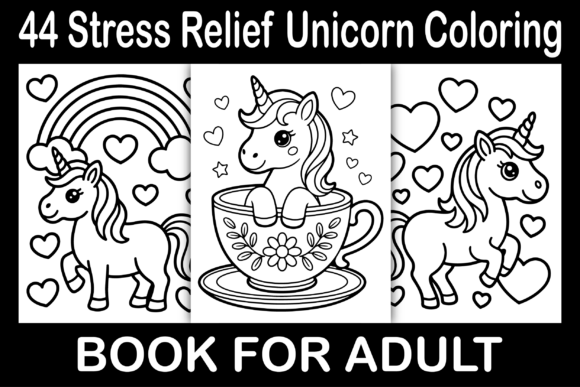
For anyone building a catalog on Amazon Kindle Direct Publishing, efficiency and quality are the two metrics that determine long-term success. The Stress Relief Unicorn Coloring Book asset package is designed to slot directly into that equation. Whether your audience is adults seeking intricate patterns or children looking for whimsical fun, this bundle provides a complete interior solution.
With 44 distinct images delivered across six formats, the real question isn't just what it is, but how it fits into your standard operating procedure. This article breaks down the practical workflow of taking these files from download to a live, print-ready KDP listing.
Understanding the Asset Package: More Than Just Pretty Pictures
The inclusion of EPS and SVG files alongside standard JPG and PNG formats signals a workflow built for flexibility. Vector formats allow for scaling without resolution loss, which is particularly useful if you want to add frame borders, adjust margins, or resize elements to fit specific KDP trim sizes beyond the standard 8.5" x 11".
When you receive a package containing 44 JPG, 44 PNG, 44 EPS, and 44 SVG files, you are not just buying images. You are acquiring a production library. The JPG and PNG files are ideal for quick placement in software like Canva or standard PDF editors. The EPS and SVG files are your workstation files, best used in professional layout tools such as Adobe InDesign, Affinity Publisher, or Illustrator. Understanding this distinction immediately streamlines your production pipeline.
Pre-Production Phase: Laying the Groundwork
Before opening your design software, the preparation work determines the smoothness of the execution. This is the "before" phase of the project workflow, and it often separates a clean listing from a problematic one.
Reviewing and Sorting the 44 Images
Not every image suits every audience. Scan through the 44 graphics and sort them into two mental piles: high-detail, complex linework ideal for adults, and open, playful designs better suited for children. This simple organizational step helps you plan the book's layout flow. You might want to front-load the book with simpler designs to build confidence, then transition into the more intricate stress relief pages.
Deciding on Page Structure
One of the first decisions in your KDP workflow is whether to use single-sided pages or double-sided pages. Given the title's emphasis on stress relief, single-sided pages with a black backing page are often preferred to prevent bleed-through when using markers. Your pre-production checklist should include:
- Margins: Standard KDP requires minimum 0.25" margins for 8.5" x 11" books.
- Bleed: If your design touches the edge of the page, you need 0.125" bleed.
- File Naming: Rename your selected SVG or EPS files numerically (e.g., "Unicorn_001") to match your page sequence.
The Production Workflow: From Raw Files to Print-Ready PDF
The production phase is where you transform the asset into a sellable product. This is the "during" stage of the project. The provided files are already high resolution, but how you assemble them dictates the final quality.
Software Choices and Asset Handling
Your choice of layout software directly impacts how you use the bundle. If you are using Canva, the JPG or PNG files are your primary assets. Drag them onto a custom 8.5" x 11" page, adjust sizing, and add a black page behind each image. Canva handles raster images very efficiently, but it is less suited for manipulating vector lines.
If you are using Affinity Publisher or Adobe InDesign, the SVG and EPS files become your preferred choice. Vector files ensure that if you scale an image down to fit a smaller margin, the line remains crisp. This control is critical when you are targeting the "Adults" segment, where intricate detail must be preserved precisely.
Building the Interior Template
- Set your document size to 8.5" x 11" (with or without bleed depending on your design).
- Place your first image center to the page.
- Apply your margins by creating a non-printing guide box. Ensure the main elements of the unicorn art stay within this safe zone.
- Duplicate the page and place the next image. Repeat for all 44 images.
- Add standard front matter: title page, copyright page, and a "This book belongs to" page.
- Export as PDF using KDP's recommended settings (PDF/X-1a or standard PDF with flattening).
Variation for Kids vs. Adults
The bundle's strength is its dual audience. For the Kids version of your listing, you might scale up specific SVG files to emphasize large, easy-to-color areas. Thicker lines are easier for young hands. For the Adults version, keep the image sizes smaller within the page frame to allow for fine motor control and detailed shading. Using the vector files, you can adjust the stroke weight of the lines globally before placing them. This customization is impossible with standard raster images.
Post-Production: Quality Control and Listing Optimization
The workflow does not end when the PDF is exported. The post-production phase ensures your book performs well on Amazon.
Proofing the Digital Download
Upload your PDF to KDP and use the online previewer. Check every single one of the 44 pages. Look for:
- Misaligned images: Ensure the unicorn stays centered on the white page.
- Break lines: Very fine vector lines might break if exported incorrectly. If you see jagged edges, re-export with higher quality settings.
- Black backing pages: If you included a black page behind the coloring page, confirm it prints correctly in grayscale.
Leveraging the Assets for Your Listing
Your KDP listing needs visual proof of quality. Use the high-resolution PNG files to create your "Look Inside" promotional images. Showcase a close-up of a detailed unicorn horn to appeal to adults, and a full-page spread of a playful scene to attract parents of younger children. Your book description should clearly distinguish between the two use cases. For example: "Inside this collection, you will find 44 high-quality designs, ranging from simple whimsical patterns for children to deeply detailed mandalas for stressed adults seeking mindfulness."
Integrating the Asset into a Broader Publishing Strategy
For the intermediate or scaling publisher, a single asset package like this becomes a repeating resource. The real efficiency gain comes from creating a master template once and populating it with future asset packs.
Batch Creation Workflows
Once you have your 8.5" x 11" template set up with correct margins, bleed, and front matter, you can reuse that structure for an entire series of coloring books. The Stress Relief Unicorn Coloring Book can be the first volume in a series. Using the same EPS and SVG workflow, you can produce a new volume every couple of days by simply swapping out the interchangeable images.
Long-Term Usability of Vector Assets
The original files you downloaded do not lose value after your first book is published. The 44 SVG and 44 EPS files become elements in your creative library. You can:
- Extract individual unicorns to use in activity books or puzzle books.
- Combine elements from multiple files to create entirely new composite designs for future projects.
- Adjust the colors and use them in digital planning stickers or printable wall art. The vector format ensures you are not locked into a single use case.
Practical Implementation Tips for a Clean Run
Based on common workflow bottlenecks, here are specific observations to keep your process clean:
- File Organization: Create separate folders labeled "SVG_Production," "PNG_Listing," and "JPG_Draft." This prevents confusion when you are switching between building your interior and designing your cover.
- Consistency Check: Verify that all 44 images are present and accounted for before you start the layout. Nothing disrupts a workflow like discovering a duplicate file.
- Audience Segmentation: Do not try to target "everyone" in one book. Use the asset pack's versatility to create two distinct listings—one clearly branded for adults and one for kids—rather than one hybrid book that satisfies neither group perfectly.
Conclusion
Success on KDP often comes down to execution. The Stress Relief Unicorn Coloring Book provides the creative core; your workflow provides the structure. By treating these files not just as images but as components within a repeatable production cycle, you save time, maintain quality, and scale your publishing efforts more effectively. From the pre-production sorting of images to the post-production optimization of your Amazon listing, every phase benefits from a deliberate, process-oriented approach. The tools are provided. The workflow is yours to build.